Done for you
Search, models, the app on the phone, robots and the sitemap, images — what the project already does without you.
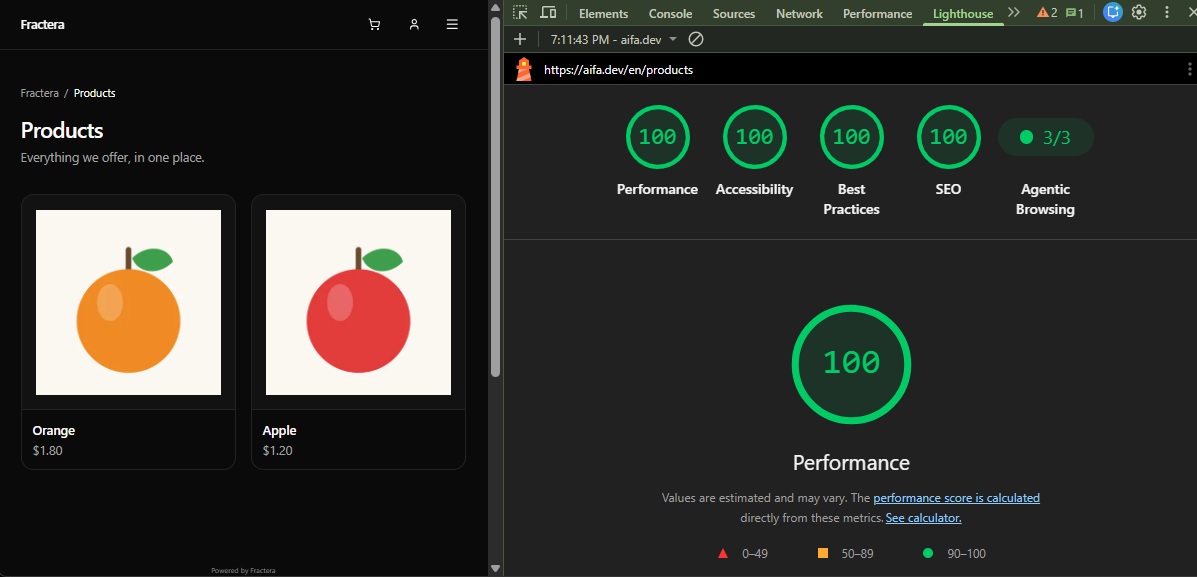
Everything on this page is already built and holding. It is here so you can see what your project does without you — and check any of it yourself.
Static generation
Public pages are built ahead of time and served as files — with practically no load on the server. A dynamic page is recomputed on every visit: a multilingual site with a hundred pages and ten languages recalculates a thousand variants for every visitor, and growth in traffic turns into growth in the bill.
Static is much harder to build than dynamic, and the difficulty runs one way: any shortcut leads from static to dynamic, never back. Reading a cookie, a request header or a session check inside a layout turns the whole subtree dynamic — silently, without an error. A particular trap waits when private pages are added: since a dynamic layer now exists anyway, it feels simpler to make everything dynamic. Bills in the tens of thousands of dollars have grown from exactly a few such lines.
So the rule is held by a machine, not by an agreement. Public and private pages live in physically separate layers, and a check walks the entire public layer looking for signs of dynamics — on a match the build stops. Not a warning, not a log entry: the release does not happen until the violation is gone. A checklist is followed for as long as it is remembered; the first shortcut would bring dynamics back, and you would learn about it from the bill.
Search
Multilingualism with modern search optimisation and an installable app is normally a long development cycle — and the one AI-written projects lose quietly: pages drift from prepared to recomputed, translations start reading as copies of each other, and half the languages never reach search results.
The language signals are in place on every public page: each one declares itself the original, names its translations for every language you enable, and adds x-default for visitors you do not cover. Without them a search engine reads translations as copies of one another and whole languages never reach results — the site meanwhile looks perfectly fine.
Models
The same is true for the reader people remember last and who is already arriving: the model. It comes itself, reads, and retells your site in its own words — so the project publishes a machine map of itself and a clean markdown twin of every page, built from the same text, so the two can never drift.
Robots and the sitemap
Robots are answered by name — search crawlers and models separately — and every map is declared to them in the first file they open. The map lists your home page, catalogue, blog and each article in every enabled language; it never lists pages behind a login, which exist per visitor and would return a sign-in form to a crawler.
App on the phone
Your site installs like an app: its own icon on the home screen, a launch without browser chrome, and pages already seen opening without a network. The offline copy never replaces the live site — pages always come from the network while it is there, so a text you change in the panel appears immediately.
Images
The page arrives with the picture already INSIDE it: a tiny blurred copy of the image, about 150 bytes, is written into the markup — no separate request for it, so the visitor sees the shape and colours of the coming image in the same millisecond as the heading. Its space is reserved in advance, from its real dimensions, so the text does not jump when the file lands. The real image follows and replaces the blurred one by itself.
This is not decoration but two of the three figures a search engine measures your page by: the layout jump as things load, and how fast the largest element on screen appears — most often that element is an image. Meanwhile a phone does not download a file made for a large monitor: the needed sizes are produced from one original on demand, the format is matched to the browser, and everything below the first screen loads only when the visitor reaches it. Works with JavaScript disabled.
Data
The project already has four stores, all on your server: rows, files, vector memory for search by meaning, and a knowledge graph for questions about connections. None of them needs to be started, configured or registered anywhere. You never design a schema: a new table is declared in one place and appears in every environment by itself — no migration files, no state where the server is ahead of your laptop.
There is no step where free becomes paid and then becomes per-request-and-per-gigabyte. Data costs exactly what your server costs, however many queries it serves; a traffic spike turns into load on a processor you already paid for, not into an invoice. Outgrow it and you take a bigger server: the price rises linearly and the data travels with you, because it is files. And we spend that server carefully — public pages are prepared ahead and never query the database, answers are cached with a stated lifetime, a list is one query per page rather than one per row.
Authorization
Sign-in, accounts and access control work from the first minute and cost nothing: no cloud sign-in service to connect, no monthly fee per active user. Email and password work with no configuration; magic-link and Google sign-in are enabled by entering keys in the panel — the code is written. The library everything is built on supports over eighty providers: connecting one is an edit to a single file, by you or with our help.
The most valuable part here is the least visible: roles are already attached to routes. To make a page available only to the right people you do not protect it — you build it on an existing route, and access lands with the holders of that role by itself. Four layers: personal account, staff, finance, administration; the first person to register receives every role at once. None of this costs speed: public pages are prepared ahead and never ask about sign-in.
Design system
Nobody decides to make a site inconsistent — the drift accumulates one harmless edit at a time. A heading slightly larger here, a margin slightly tighter there, a card with a rounder corner on the third page. Each decision is reasonable on its own, and none of them looks like a mistake.
Then comes the part that matters for AI-assisted work: an agent reads the existing code as its example. While there is one way to describe a heading, it repeats that way. Once there are three, the agent draws a conclusion that is flawless from where it stands — there is no single rule here, so anything goes — and every new page adds a fourth. The more you build, the faster the drift. Here it is closed by primitives, tokens and four machine-checked laws that run inside the build: a violation does not reach the product, it stops the release.
Works with JavaScript off
Pages arrive as finished HTML from the server, and links are ordinary links — so the site reads and navigates with scripts disabled. This is not an advantage over a dynamic application, and interactive parts do degrade; but if yours is an informational site, visitors can use it safely in any environment, including ones where scripts are blocked for them.
What it costs to run
Here it is built, tested many times over, and it holds under load at no extra server cost: a prepared page costs the same at a hundred visits and at a hundred thousand.
So the only thing left for you is the choice of languages. Whichever you pick, nothing else here is left to build.